iPhone notifications
Since version 1.0.44, Vibe Island can forward approvals, questions, finished tasks, and warnings from every agent it watches to your iPhone. The transport is Bark, a free, open-source iOS notification app. No account is required, and nothing passes through Vibe Island servers: your Mac posts directly to Bark’s push service.
Requirements
Section titled “Requirements”- Vibe Island 1.0.44 or newer on the Mac
- An iPhone with the free Bark app installed
This channel only notifies. Approving and answering still happen on the Mac. If you wear an Apple Watch, iOS mirrors the alerts there automatically.
Step 1: Install Bark on your iPhone
Section titled “Step 1: Install Bark on your iPhone”Install Bark from the App Store, or expand Don’t have the Bark app? in Vibe Island’s setup sheet and scan the QR code with your iPhone camera.
Open Bark once after installing and allow notifications when iOS asks. If that prompt is dismissed, the server keeps accepting pushes while the phone silently ignores them.
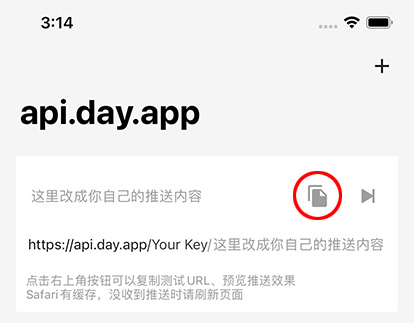
Step 2: Copy your device key
Section titled “Step 2: Copy your device key”Bark’s home screen shows example URLs such as
https://api.day.app/AbCdEfGh/.... The short segment after the domain is
your device key, and it is the only value Vibe Island needs. Every
example on that screen contains the same key.
Step 3: Connect and send a test
Section titled “Step 3: Connect and send a test”- On the Mac, open Settings, then Notifications, and turn on Notify my iPhone. The setup sheet opens automatically. It can be reopened later from Configure… on the Connection row.
- Leave the server on Bark Public unless you run your own bark-server, and paste the key from Step 2 into the Device Key field.
- Click Send Test. The Mac shows Accepted by Bark. Check your device. and the phone shows a banner. Once both appear, click Save.
Delivery behavior
Section titled “Delivery behavior”Only notify when I’m away from this Mac is on by default. Away means the screen is locked or off, or the Mac has been idle for about two minutes. Working at the Mac while watching the phone does not count as away; turn the toggle off to push every event regardless.
Notify me about selects which events reach the phone: Approvals, Questions, Completed tasks, and Warnings, all enabled by default. One session occupies one notification: a state change updates the banner in place instead of stacking a new one, and handled items are withdrawn where Bark supports it.
By default a notification names the agent and the project, nothing more. Include conversation details adds the conversation title and a short excerpt of the reply, question, or warning. That text then passes through a push server; consider enabling encryption first.
Encryption
Section titled “Encryption”With encryption on, the title and body are encrypted on the Mac with AES-256-GCM before anything is sent. The push server relays ciphertext it cannot read. Setup happens on both devices:
- On the Mac: in the setup sheet, turn on Encrypt notification content. Vibe Island generates a Key and an IV; copy them with Copy Key and Copy IV.
- On the iPhone: in Bark, stay on the home tab and scroll down to Push Encryption. Open the encryption settings, choose AES256, GCM, and NoPadding, paste the Key and IV, and save.
Even with encryption on, the server still sees the device key and delivery metadata. Encryption has no effect on whether a push arrives; it only hides the text.
Self-hosting
Section titled “Self-hosting”Pick Self-hosted in the setup sheet and enter your own bark-server’s HTTPS address. Plain HTTP is rejected. Everything else works the same. Self-hosting combined with encryption is the strictest privacy setup available.
Troubleshooting
Section titled “Troubleshooting”Send Test fails no matter what is pasted
Section titled “Send Test fails no matter what is pasted”The pasted value is probably the Device Token from Bark’s settings screen.
The key is the short segment in the URLs on Bark’s home screen: in
https://api.day.app/AbCdEfGh/... it is AbCdEfGh. Paste just that part
and test again.
Send Test says accepted, but the phone shows nothing
Section titled “Send Test says accepted, but the phone shows nothing”Accepted means Bark’s server took the message; whether a banner appears is up to iOS. Open iOS Settings, then Notifications, then Bark, and check that Allow Notifications is on. Also, if encryption is enabled in Vibe Island but the Bark side was never configured, the phone cannot read what arrives. Finish that setup, or turn encryption off and test again.
Nothing arrives while sitting at the Mac
Section titled “Nothing arrives while sitting at the Mac”Working as designed. Only notify when I’m away from this Mac is on by default, and away means the screen is locked or off, or the Mac has been idle for about two minutes. Turn the toggle off to push every event.
Approving or answering from the phone
Section titled “Approving or answering from the phone”Not supported. The phone signals that something is waiting; the action happens at the Mac.
Apple Watch delivery
Section titled “Apple Watch delivery”Works through normal iOS notification mirroring: when the iPhone is locked, alerts go to a paired Watch. There is nothing to configure in Vibe Island.
Notifications stopped after enabling encryption
Section titled “Notifications stopped after enabling encryption”Encryption never affects whether a push is sent. The usual cause is the away-only default holding pushes back while at the Mac. If notifications arrive but look garbled, the Bark side does not match: it must be AES256, GCM, NoPadding, with the exact Key and IV copied from Vibe Island.